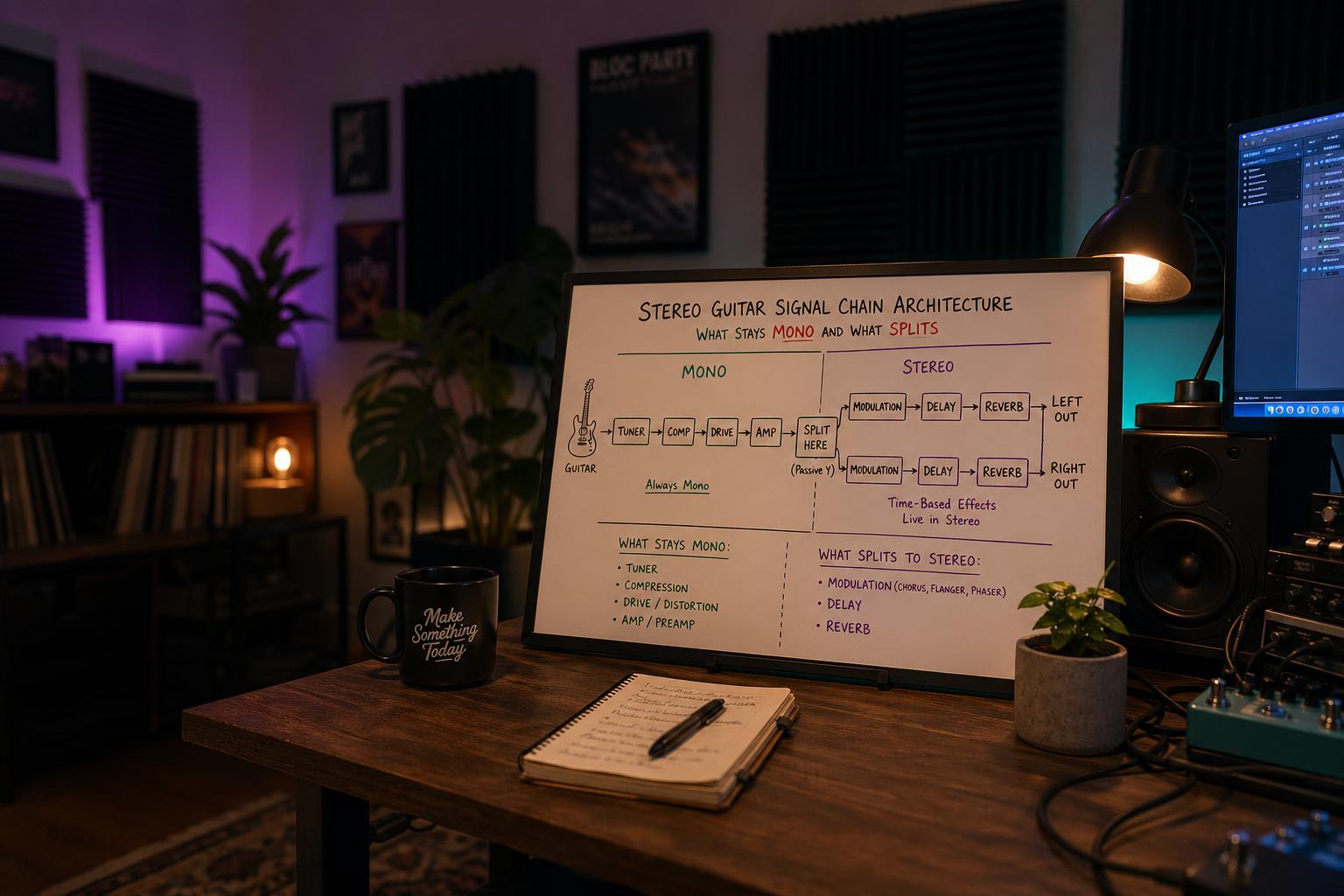
The short version: Run dirt mono. Split to stereo at the modulation block (chorus, phaser, flanger if you use one, or just before the delay). Keep delay and reverb stereo to the output. Route as: guitar → preamp/dirt (mono) → split → modulation L/R → delay L/R → reverb L/R → output L/R. The common mistake is splitting at the amp model, which sends two slightly different dirt signals through the modulation and creates phase issues. The amp is mono. The space is stereo. The split point is the moment time-based effects start contributing to the picture.
I built my first Quad Cortex preset in stereo because I assumed stereo was just better. Two cab models panned hard, two amp models slightly different (wide, thick, professional). It sounded terrible in mono fold-down (any time the listener was on a phone, in a kitchen with one speaker, or on YouTube without headphones) and it sounded weirdly phasey on stereo monitoring. The wider it got the worse it sounded.
The fix wasn't more stereo. The fix was understanding that "stereo" describes a relationship, not a setting. A stereo signal isn't two copies of a signal panned hard. A stereo signal is two related-but-distinct signals that share a source. The relationship is what gives a stereo image its sense of space. Two identical signals panned hard sound mono with phase artifacts. Two unrelated signals panned hard sound like two instruments. The sweet spot (where a single guitar sounds wide, three-dimensional, and present without losing center focus) is a specific architecture, not a feature you turn on.
This is the architecture.
The Rule: Mono Until You Need Stereo
| Block | Mono or Stereo | Why |
|---|---|---|
| Guitar pickup | Mono | The instrument is a single source |
| Drive / fuzz / overdrive | Mono | Distortion sums to mono regardless; stereo distortion is a phase trap |
| Compressor | Mono | Linked stereo compression is fine; identical mono compression on a single source is the same thing |
| Amp model | Mono | The amplifier is a single device with one output. Two amp models in parallel is a different effect (parallel amp routing), not stereo |
| EQ (utility) | Mono | Same reasoning as compression |
| Modulation (chorus, flanger, phaser, tremolo) | Stereo split point | The effect's whole job is to create relational difference between two channels; this is where stereo is born |
| Delay | Stereo | Different delay times left and right create the spatial picture |
| Reverb | Stereo | Reverb is fundamentally a stereo phenomenon; mono reverb is a degraded reverb |
| Output to interface or front-of-house | Stereo | Once it's stereo, keep it stereo to the destination |
The split point is the modulation block. Everything before is mono. Everything after is stereo. This is the architecture that produces a wide, coherent, mono-summable signal chain.
Why Splitting at the Amp Is the Common Mistake
Most beginner stereo presets put the split before the amp model: guitar → split → amp L → amp R → cab L → cab R → effects → out. The reasoning sounds correct (two amps for width) but the result is wrong, and here is why.
Two amp models running in parallel produce two distinct distortion characters. Distortion is non-linear, which means small differences in input level, EQ, or model variation get amplified into large differences in output. When you sum two distorted signals (which the listener's ear effectively does when listening on speakers), you get phase cancellation in the high mids (the exact frequency band where pick attack lives) and a tone that feels small even though it's playing through two amplifiers.
You can hear this without any tools. Build a preset with one amp model. Build a preset with two identical amp models in parallel, panned hard. A/B them in mono. The single-amp version sounds bigger. The double-amp version sounds slightly smeared. This is comb filtering caused by the two amp paths producing minutely different signals that interfere when summed.
Now do the same A/B in stereo. The double-amp version sounds wider in headphones, but listen to a snare-and-vocal mix and the guitar moves back in the picture, sits less coherently, and loses its identity. Width is not the same as size. A focused mono signal with stereo space around it almost always sits better than a wide stereo signal that fights itself.
The rule: put the amp before the split. Run one amp model into the modulation block, and let the modulation block be where the stereo image is born.
Why the Modulation Block Is the Right Split Point
A chorus, a phaser, a flanger, or a stereo tremolo all do the same architectural thing: they take a mono input and produce two related output signals that differ in some way (pitch modulation, phase modulation, amplitude modulation). The two output signals are close enough to read as a single source but different enough to create a sense of space when panned.
This is exactly what stereo is supposed to do. The modulation block is doing the work that "stereo" describes: generating a related-but-distinct pair of signals from one source.
If you don't use modulation in your tone, the stereo split moves to the delay block. A ping-pong delay or a stereo delay with different times left and right serves the same function: it generates a related-but-distinct pair of signals from one input. The stereo image is born at the first effect that creates a left-right relationship from a single signal.
Reverb extends and deepens the stereo image but does not create it. A mono signal into a stereo reverb produces a stereo reverb tail with a mono dry signal (usable but flat). The stereo image has more depth when modulation or delay creates the L/R relationship before the reverb arrives.
For a complete stereo workflow with two reverbs in parallel, the parallel reverb routing post covers that specific architecture in detail. The principles in this post inform the parallel reverb decision: you want the reverbs receiving an already-stereo signal so each one is treating an L/R pair coherently.
Building a Stereo Helix Preset
The Helix's signal flow editor makes the split point explicit. Build the preset like this:
- Block 1 (mono path): Drive or compressor (if using)
- Block 2 (mono path): Amp model (mono input, mono output)
- Block 3 (mono path): Cab model or IR (mono input, mono output)
- Block 4: Y-split (or use the path split control); this is where the signal becomes stereo
- Block 5 (stereo): Modulation (chorus, etc.); input mode set to stereo
- Block 6 (stereo): Delay; input mode set to stereo
- Block 7 (stereo): Reverb; input mode set to stereo
- Output: Stereo to L/R outputs
The amp and cab are mono blocks in path 1. The split happens after the cab. The modulation onward is stereo. This is the correct architecture for the Helix and it produces a clean mono-summed signal with a coherent stereo image.
If you don't have a modulation block, the split happens at the delay. The principle is identical.
The One Helix-Specific Exception to the Category Table
Everything above sorts blocks by category — compression is mono-appropriate, modulation is where stereo begins — and on the Helix there is a subcategory where that mapping does not hold. The Legacy models, carried over from the POD-era units, have their own mono/stereo behaviour that Line 6 documents by category rather than by model:
- Legacy Distortion, Dynamics and Pitch/Synth models are all mono.
- Legacy Filter and Reverb models are all stereo.
- Legacy Modulation and Delay models vary, and the manual explicitly does not say which is which.
That first line is the one that breaks presets built to the architecture on this page. All seven Legacy compressors are mono, so dropping one into step 5, 6 or 7 above will collapse everything upstream of it back to mono — the manual's wording is that a mono block "will collapse any preceding stereo blocks on the same path." You will have followed the split-point rule correctly and still be mono from that block onward, and the mono fold-down test below will pass, because there is nothing left to fold down.
The check is per-block and takes two seconds: a stereo block shows a stereo indicator after its model name in the inspector. The full per-category inventory, the models the manual won't resolve, and the ordering rule that works around it are in Helix Legacy blocks are mono.
Building a Stereo Quad Cortex Preset
The Quad Cortex makes routing visible on the touchscreen, which makes this even clearer. Build the grid like this:
- Row 1: Compressor (mono) → Amp (mono) → Cab (mono)
- Splitter at the end of Row 1, set to L/R split
- Row 2A (top): Modulation L → Delay L → Reverb L → Output L
- Row 2B (bottom): Modulation R → Delay R → Reverb R → Output R
In practice you'd actually use stereo blocks rather than two parallel mono blocks; the Quad Cortex's modulation, delay, and reverb blocks have stereo I/O when placed after a splitter. But the architecture is the same: mono before the split, stereo after.
The QC also supports a parallel amp configuration where two amp models run in parallel and are summed back to mono before the modulation. This is different from stereo amp routing. You're using two amps for tonal blend (one tight high-gain, one wider clean, for example) and then treating the sum as your mono source. This is a valid technique that some Plini-style fusion players use, and the Quad Cortex preset from scratch post covers the parallel amp blending workflow.
What About Stereo Drive Pedals?
Some boutique pedals (Empress Echosystem, certain Strymon multi-effect units) include stereo dirt or stereo drive sections. The marketing implies these are stereo drives but the implementation is almost always: mono dirt input, then stereo modulation or stereo character on the output.
Even when a pedal sells "true stereo" drive (two distinct gain stages), the architecture I'm describing still applies: those two gain stages are doing modulation work, not amplification work. They create a stereo image; they aren't "two amps in parallel." The semantic distinction matters for how you treat the signal in the rest of your chain.
If you have one of these pedals and you're using its stereo output, the rest of your chain should already be stereo. The split happened inside the pedal. Don't add another splitter downstream. The signal is already in stereo and adding a second splitter creates redundant routing.
The Mono Fold-Down Test
Every stereo preset I build gets tested in mono before I declare it finished. The test is:
- Load the preset.
- Sum the L/R output to mono (most DAWs have a mono fold-down button; on hardware monitors there's usually a mono switch).
- Listen for: phase issues (hollow midrange), level drop (signal getting quieter when summed), or smearing (transients losing definition).
A correctly architected stereo preset survives mono fold-down with no significant change. The level stays the same. The transients stay sharp. The midrange doesn't develop a hollow character. This is because the architecture has only one mono signal until the modulation block. When summed back to mono, the modulation contribution mostly cancels back to the original mono signal, and you hear roughly the same tone as the un-stereo version.
A poorly architected stereo preset (split before the amp, dual cab routing) loses 3 to 6 dB on mono fold-down. The signal gets smaller, the high mids hollow out, the transients smear. This is comb filtering from the parallel amp paths, and you cannot fix it in mastering. You can only fix it in the architecture.
This test is the single most useful tool for evaluating whether your stereo work is correct. If the preset survives mono fold-down, the architecture is right. If it doesn't, restructure it.
What the Split Point Does Not Protect You From
The architecture above solves exactly one problem: it stops two slightly different copies of your dirt signal from comb filtering against each other. That is the problem worth solving first, because it is the one that costs you 3 to 6 dB and cannot be recovered downstream.
It is not the only way a preset fails in mono, and this is where a correctly built chain still surprises people at a gig. Everything after the split point is stereo by definition, and some stereo blocks build their width out of a fixed time offset between the two channels. Those blocks comb-filter on fold-down regardless of how clean your architecture is upstream.
The specific offenders, in rough order of how often they show up in a preset that otherwise passes:
| Block | Why it fails the fold-down | What to use instead |
|---|---|---|
| Imager or width block using a short delay | A fixed offset of 10 to 35 ms puts comb notches every 30 to 100 Hz | A pitch-based detune of 5 to 8 cents per side |
| Ping-pong delay | Alternating hard-panned taps collapse to a plain centered delay | Dual delay with different times per side, e.g. 380 ms and 570 ms |
| Dual cab hard-panned | Two mic positions are a time offset — the same comb, one block earlier | One cab, or sum the two cabs to mono before the split |
| Stereo chorus at high depth | The comb notches sweep, producing a phaser you did not ask for | Same block at roughly half the depth |
| Two parallel reverbs, same pre-delay | Correlated early reflections arrive together and cancel | Offset the pre-delays by 10 to 20 ms |
The pattern is that width built from a time difference fails and width built from a pitch or performance difference survives. Which techniques land where, and what each one actually sounds like after the sum, is worked through in detail in which stereo widening tricks survive a mono PA.
Bisecting a Failed Fold-Down
When the fold-down test fails on a preset you believe is architecturally correct, don't rebuild it. Find the block.
- Bypass every block after the split point. Run the fold-down test. This should be clean — you are testing the mono chain against itself, and if it isn't clean the problem is upstream and the architecture is genuinely wrong.
- Re-enable one block. Test. Note the result.
- Repeat until the fold-down degrades. The block you just enabled is the one building width from a time offset.
- For that block, check three parameters in this order: width or spread, any delay or pre-delay offset between channels, and modulation depth. One of them is almost always the whole problem.
- Save the working version before you continue. A preset that passes in both contexts is worth a snapshot you can return to.
This takes about four minutes on a preset with six blocks after the split, and it is considerably faster than the alternative, which is rebuilding the chain and hoping. It also tells you something durable: once you have found the same offender twice, you stop putting it in presets that have to survive a house PA.
How Much Wider Stereo Actually Gets You
I expected stereo presets to feel meaningfully bigger than mono presets in stereo monitoring. They do, but the difference is smaller than I expected once the architecture is correct, and the trade-off is significant.
A correctly architected stereo preset (mono dirt, stereo time effects) sounds maybe 15 to 20 percent wider than the same tone in mono. The improvement is real but it's not transformative. What I didn't expect was how much better the correctly stereo'd preset sounds in mono fold-down compared to the incorrectly stereo'd one. The correct architecture is essentially identical to the mono version when summed, while the incorrect architecture produces a noticeably degraded mono signal.
This reframes the entire stereo question. The point of stereo isn't to make the preset wider in stereo monitoring; that benefit is real but small. The point is to add a coherent spatial dimension that doesn't damage the tone when the listener isn't on stereo. The stereo chain is the mono chain plus a spatial layer. If the stereo chain damages the mono chain, the architecture is wrong regardless of how it sounds in headphones.
I now build mono first, verify the tone, and then add stereo as the last layer. This is opposite to my old workflow (build stereo, fold down to mono, fix problems) and it produces presets that work in both contexts without compromise.
For more on the routing decisions that interact with this architecture, the parallel reverb routing post covers running two reverbs side-by-side rather than in series, and the HX Stomp polarity trick post covers the inverted-cab technique that creates apparent width through phase manipulation rather than time-based stereo. Both are worth reading once the basic mono/stereo architecture is solid.
Build your next preset mono first. Get the tone you want from a single channel of monitoring. Then add the stereo layer at the modulation block and verify with a mono fold-down test. The discipline of separating "tone" from "spatial picture" produces presets that work in any monitoring context, and the architecture stops being a routing puzzle and starts being obvious. Mono until you need stereo. Split at the modulation block. Output stereo. That's the rule. Everything else is implementation detail.